Core Concepts
Compose
Jetpack Compose's declarative model, recomposition rules, and the stability / state APIs that separate a fast Compose UI from a janky one.
Jetpack Compose is the default Android UI toolkit on every greenfield app. The shift from XML + View is not cosmetic: the rendering model, the threading rules, and the performance tools are different enough that "I know XML, Compose cannot be that different" is the trap. This page covers what changes from the imperative View system, what recomposition actually does, the stability rules that decide whether Compose can skip work, the state APIs (remember, rememberSaveable, derivedStateOf), why modifier chain order is semantically meaningful, and the performance levers visible in Layout Inspector. The pipeline beneath Compose (the choreographer, the render thread, the GPU handoff) lives in How rendering works; this page is the Compose-layer view.
The declarative model
In the imperative View world you hold a reference to a TextView and call setText("hello"). The view's state is the source of truth; you mutate it. In Compose you write a function:
@Composable
fun Greeting(name: String) {
    Text("Hello, $name")
}
When name changes, Compose re-runs the function with the new value. There is no TextView reference, no setText, no manual diff. The function's output is the new UI description; the runtime decides what actually changed on screen.
The mental model overlaps with React but the implementation does not. React produces a virtual DOM tree and diffs it against the previous one. Compose has no virtual DOM. Every composable call writes entries into a structure called the slot table, a flat, gap-buffered list indexed by source position. On recomposition, the runtime walks the same positions, sees which inputs changed, and only re-executes the affected groups. The output is a LayoutNode tree (the equivalent of a View tree) updated in place.
Practical consequences follow from the slot table. Composables are positional: identity comes from source position, not an explicit key (so if (cond) Foo() else Bar() is two distinct slots). They are restartable: Compose can re-call any one of them with new arguments without re-running its parents. They are not free: each call writes slot-table entries, so cheapness comes from the runtime skipping most of them, not from the calls themselves being free.
Composition, layout, drawing
A Compose frame has three phases:
- Composition: your composable functions run; the slot table updates; the
LayoutNodetree is reconciled. - Layout: each
LayoutNodemeasures itself and its children, then places them. - Drawing: each node records its drawing commands into a display list, which is later played on the render thread.
The phases are independent. If only a drawing-side property changes (a color, a translation read inside Modifier.graphicsLayer { ... }), Compose skips composition and layout and only re-records the affected node's display list. The same deferred-read trick works one phase earlier: reading the animated value inside Modifier.offset { ... } defers it to the layout phase's placement step, so changing it re-runs layout and drawing but skips recomposition.
val offsetX by animateFloatAsState(targetValue)

// Recomposes every frame - the read happens during composition.
Box(Modifier.offset(offsetX.dp, 0.dp))

// Skips recomposition - the read happens during the layout (placement) phase.
Box(Modifier.offset { IntOffset(offsetX.toInt(), 0) })
This is one of the highest-leverage Compose performance idioms. How rendering works covers the choreographer / render-thread plumbing that turns these display lists into pixels.
Recomposition and stability
The runtime's job is to recompose as little as possible. When the inputs to a composable change, Compose decides between two outcomes for each call site:
When state changes, Compose first checks parameter stability and equality. If everything matches the previous render, it skips recomposition entirely. Otherwise it re-executes the composable and asks whether the output changed. Identical output skips layout and drawing; different output re-layouts only the affected nodes.
The skip decision rests on stability: "can Compose trust this type's equals() to mean the value has not changed?" The compiler infers stability for most cases:
- Primitives,
String, function references,MutableState<T>are always stable. - A
data classwith only stablevalproperties is stable. - A class with any
var, or any property of an externally-defined non-stable type, is unstable. - Anything imported from a module without the Compose compiler plugin is assumed unstable (the compiler cannot see it).
When the compiler cannot prove stability, annotate: @Immutable ("all public properties are vals that never change after construction") or @Stable ("I may mutate, but I notify Compose of every change"). The third lever is immutable collections. Stock List<T> is unstable because the interface allows mutation. kotlinx.collections.immutable's ImmutableList<T> and PersistentList<T> are stable by construction. For any composable that takes a list parameter and recomposes more often than expected, swapping to ImmutableList is usually the fix:
@Composable
fun PostList(posts: ImmutableList<Post>) { /* skippable */ }
Compose Compiler 1.5.4 shipped strong skipping mode. With it on, all composables become skippable even with unstable parameters: the runtime falls back to instance equality (===) for those. This eliminates most "everything always recomposes" failures from third-party types. It is on by default in new templates and is the right baseline.
Sources: Compose stability · Strong skipping
State, remember, and derivedStateOf
Compose state lives in State<T> / MutableState<T> objects. Reading a State value inside a composable subscribes that composable's smallest enclosing recompose-scope to that state. When the value changes, only that scope re-executes.
remember { ... } stores a value in the slot table so it survives recomposition. Without it, every recomposition re-runs the initializer:
// Reset on every recomposition: wrong.
var expanded by mutableStateOf(false)

// Survives recomposition. Lost on Activity recreation.
var expanded by remember { mutableStateOf(false) }

// Survives recomposition and rotation / process death (Bundle-backed).
var query by rememberSaveable { mutableStateOf("") }
The split mirrors a View's in-memory state vs onSaveInstanceState. Use remember for transient UI (a hover flag, an expanded row); rememberSaveable for anything the user expects to survive rotation or process death (search query, scroll position, form input).
derivedStateOf is the operator for "recompose only when a threshold on this state crosses, not every time the underlying value moves":
val showScrollToTop by remember {
    derivedStateOf { listState.firstVisibleItemIndex > 0 }
}
The rule: derive when the derived value changes less often than the source. firstVisibleItemIndex changes 60 times a second during scroll; the boolean changes twice in a session. Without derivedStateOf, every scroll pixel recomposes the consumer; with it, only threshold crossings do. If derived and source change at the same rate, skip it and compute inline.
LaunchedEffect(key) launches a coroutine tied to the composable's lifetime, cancelled when it leaves composition and re-launched when the key changes. collectAsStateWithLifecycle() collects a Flow only while the lifecycle is at least STARTED, the right default for screen-level state. Plain collectAsState() collects regardless of lifecycle and quietly wastes work when the screen is offscreen.
val state by viewModel.state.collectAsStateWithLifecycle()Lifecycle-aware effects
LaunchedEffect ties a coroutine to composition lifetime: cancelled when the composable leaves the tree, re-launched when the key changes. Three companion APIs tie work to the host's lifecycle instead, which is the right scope whenever the work should pause when the screen goes offscreen even though it is still in composition (kept warm by the navigation back stack, an animated transition, or a pager off-screen page):
LifecycleStartEffect(key) { onStopOrDispose { ... } }registers synchronously onON_STARTand cleans up onON_STOP. The Compose-native replacement foronStart/onStopoverrides. Right for things like location listeners, sensor callbacks, and dynamic broadcast receivers, anything that should sleep while the screen is offscreen but resume when it returns.LifecycleResumeEffect(key) { onPauseOrDispose { ... } }has the same shape forON_RESUME/ON_PAUSE. Right for resources that must not run while another foreground activity is on top (camera preview, foreground-only sensors).repeatOnLifecycle(STARTED) { ... }is the asynchronous variant. Launch a block while the lifecycle is at leastSTARTED, cancel it onSTOPPED.collectAsStateWithLifecycleisrepeatOnLifecycleplus state hoisting, packaged for the common Flow-collection case.
The interview-grade point: in a Compose host, overriding onResume / onPause on the Activity to drive a screen's start / stop wiring is a smell. It couples the screen to the Activity's lifetime instead of its own, breaks the moment the screen moves between activities (deep link, nav drawer, multi-window), and skips the structured-cleanup guarantees these effects ship with.
One exception to the immutable UiState rule is PagingData. It is mutable by design (the Pager mutates the underlying stream as new pages load), so it lives outside the data class UiState and is exposed from the ViewModel as its own stream, collected in the UI via collectAsLazyPagingItems().
Sources: Compose side effects · Compose architectural layering
Modifiers
A Modifier is an ordered, immutable list of effects applied to a composable. Order matters. Each modifier sees the constraints imposed by everything before it and applies its effect, which everything after it sees:
// Padding is inside the background: the background fills the larger box.
Box(Modifier.padding(8.dp).background(Color.Red))

// Padding is outside the background: the background fills only the inner box.
Box(Modifier.background(Color.Red).padding(8.dp))
The first paints red, then insets. The second insets first, then paints, so the outer 8 dp ring stays transparent. This is not a quirk; it is the entire mental model. A modifier chain is a fold: each modifier wraps what came before with its layout / drawing / pointer-input behavior.
The same logic applies to .clickable { } vs .padding(...):
// Click hit area extends to the padded outer rect.
Modifier.padding(16.dp).clickable { onTap() }

// Click hit area is only the inner content.
Modifier.clickable { onTap() }.padding(16.dp)
Modifier.onGloballyPositioned { ... } exposes a node's measured size and position, but it fires after every layout pass and is a common source of recomposition feedback loops. If you find yourself writing to state from inside it, ask whether the dependency could go the other way.
Performance
Compose tooling answers two questions: what is recomposing more than it should, and where unstable parameters are dragging the runtime down.
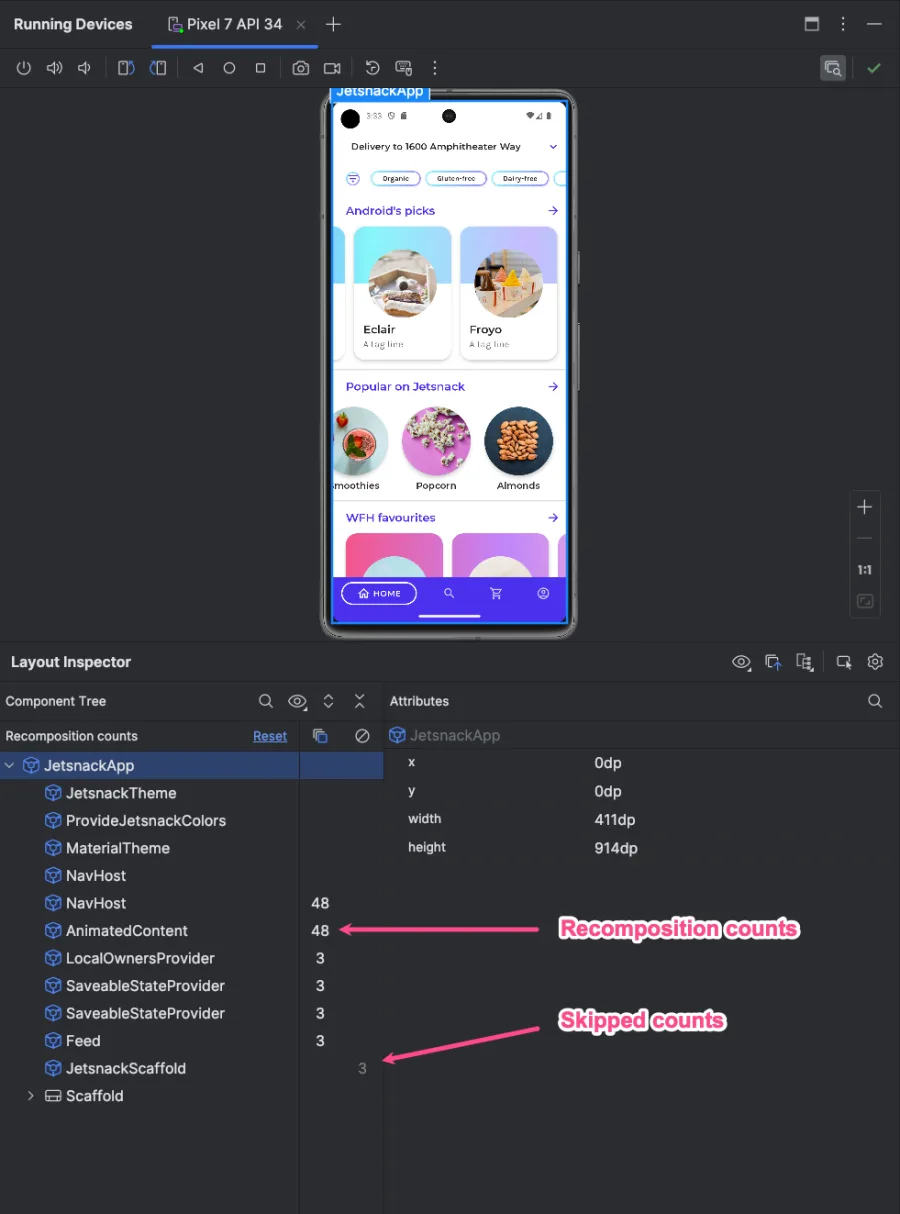
- Layout Inspector shows per-composable recomposition counts. A counter that ticks every frame on a node that should not be changing is the smell. Drill into the parameter list; one is almost always unstable.
- Recomposition highlighter overlays a colored border that pulses on each recomposition. "Every node flashes on scroll" means missing keys or stability.
- Compose Compiler metrics emit a per-composable report (
skippable,restartable, the inferred stability of each parameter), the canonical way to find which of your types Compose treats as unstable.
The recurring fixes: add key = { it.id } to every LazyColumn (without it, reorder re-creates every visible item); hoist captured state out of lambdas or remember(stableKey) { { onClick(id) } } them explicitly; switch animated-value modifiers to the lambda form (Modifier.offset { ... }); replace List<T> parameters with ImmutableList<T>; verify strong skipping is on (composeOptions, Compose Compiler 1.5.4+).
Sources: Compose performance · Compiler metrics
Interop with Views
The Compose / View bridge is two-way and stable.
AndroidView embeds a View inside Compose. The factory block runs once; the update block runs on every recomposition to sync state. Use for MapView, WebView, SurfaceView, camera previews, anything without a Compose-native equivalent:
AndroidView(
    factory = { ctx -> MapView(ctx).apply { onCreate(null) } },
    update = { it.getMapAsync { map -> map.moveCamera(target) } },
)
ComposeView embeds Compose inside a View hierarchy. Drop it into a Fragment's onCreateView and call setContent { ... }. This is the standard incremental-migration path: Fragment by Fragment, leave navigation and DI alone, swap UI to Compose:
override fun onCreateView(...) = ComposeView(requireContext()).apply {
    setContent { FeedScreen(viewModel) }
}
Whether migration is worth it is an honest tradeoff. New screens in Compose: yes, tooling and iteration pay back fast. Bulk migration of a stable 200-screen app is usually no, unless you are already touching every screen for a redesign. "The old code works" is a valid answer.
See also
- Concurrency:
LaunchedEffectis a coroutine scope;collectAsStateWithLifecycleconsumes Flows; the cancellation rules from coroutines apply directly to effects. - How rendering works: the choreographer, render thread, and GPU handoff that turn Compose's display lists into pixels.
- State Management:
SavedStateHandle, process death, restoration; the layer aboverememberSaveable. - Performance: Macrobenchmark, Baseline Profiles, and frame-timing tooling for the whole rendering pipeline.
Used in
- Photo Gallery App: the upload screen binds to a Room
Flow<UploadRecord>viacollectAsStateWithLifecycle; the album grid is aLazyVerticalGridkeyed by photo id. - Newsfeed App: the feed list is a
LazyColumnwithkey = { it.id }andcontentTypedistinguishing posts from ads; the "scroll to top" button is gated byderivedStateOfonfirstVisibleItemIndex. - Messenger App: the conversation screen is a
LazyColumn(reversed); the typing indicator and presence state are hoisted state collected viacollectAsStateWithLifecycle. - Doc Editor App: the document surface is custom-drawn through
Canvas/drawBehind; selection state is a hoistedMutableStateread inModifier.pointerInput. - Music Player App: the now-playing screen uses
Modifier.graphicsLayer { ... }and deferred reads to animate album art transitions at 60 fps without recomposing the surrounding hierarchy.
Done reading? Mark it so it sticks in your dashboard.