Mobile Core Concepts
App Size and Delivery
Why every megabyte you ship costs install rate and startup time, and the delivery pipeline an interviewer probes when "app size" or "cold start" lands on the table.
Shipping an Android app is not the same shape as compiling it. The build produces source artifacts; the delivery pipeline decides what bytes the user's device downloads, what gets AOT-compiled before first launch, and what runs as bytecode. This page covers the AAB as the upload format, R8 as shrinker / optimizer / obfuscator, resource shrinking, baseline profiles as install-time AOT hints, dynamic feature modules, and the per-install size budget. The Gradle / AGP plumbing under all of this is covered in Build Systems; this page is the delivery-side view.
APK vs AAB
The APK has been Android's install artifact since v1: a signed zip containing classes.dex, resources, native .so libraries, and a manifest. For a decade it was also the distribution format - the same APK shipped to every device.
The Play App Bundle (AAB) replaced that in mid-2021 as the mandatory upload format for new Play apps. An AAB is a build-time-only artifact: a zip whose layout splits code, resources, language, density, and ABI into separate dimensions. The Play Store consumes the bundle and generates per-device APKs at install time, sending each device only what it can use: one ABI's native libraries (not five), one density's drawables (not six), the user's locale strings (not 80). Same source, smaller install.
The delivery model has three knobs that ride on top of the AAB:
- Configuration APK splits - the default. Every AAB produces per-device APK sets along the
language / density / abiaxes automatically; this is what AAB is. Sideloading means downloading a.apksset withbundletool, or generating a universal APK from the bundle. - Play Feature Delivery (dynamic features) - a
com.android.dynamic-featuremodule the base APK requests after install via Play Core'sSplitInstallManager. Three modes:install-time(with the base app but separate),on-demand(when the user reaches the feature),conditional(if the device meets a hardware or user-segment predicate). - Play Asset Delivery - the same model for non-code assets (media, game levels, ML models). Modes:
install-time,fast-follow(immediately after install in the background),on-demand. A 200 MB ML model does not need to be inside the install APK.
For sideloading you ship either a universal APK (every ABI / density / locale - pre-AAB shape) or a .apks bundle installed with bundletool install-apks. Universal APKs are the largest possible install; only emit one when sideloading is the actual distribution path.
Sources: Android App Bundle · Play Feature Delivery
Dynamic feature modules
A dynamic feature is a com.android.dynamic-feature Gradle module whose code and resources download after the base app installs; the Play Store packages it as a separate split APK. Two architectural costs make dynamic features expensive:
1. The DI graph cannot reach into the feature directly
The base module is compiled without knowing the feature's classes - that is the whole point. Direct imports, DI bindings, and symbol references are impossible. The base either reaches in via reflection (Class.forName("com.example.ar.ArEntryPoint") once installed) or via a service-locator pattern: SplitInstallManager plus a shared-module interface the feature implements. Most teams pair this with a thin Dagger / Hilt sub-component owned by the feature - see Dependency Injection.
2. The install handoff has UX latency
SplitInstallManager.startInstall(request) triggers a download - hundreds of milliseconds to seconds of "loading..." on slow connections. The base app must render progress, handle cancel, handle network errors, and handle the user backgrounding mid-install.
When dynamic features earn their complexity: large optional features used by a fraction of users - an AR scanner with a 30 MB native dependency, an in-app minigame, a feature exclusive to one country. When they do not: code organization. That is what library modules are for; dynamic features are an install-time mechanism, not a code-organization one.
R8 - the release pipeline
R8 turns kotlinc-emitted classfiles into the compact, obfuscated classes.dex shipped in a release build. AGP wires it into every assembleRelease; debug skips it. Four passes:
- Shrinking - starting from the manifest entry points and anything matched by keep rules, R8 walks the call graph and drops unreachable classes / methods / fields. Commonly removes 30-60% of methods, since the dependency closure is much larger than what actually runs.
- Optimization - inlining, constant propagation, dead-branch elimination, sealed-hierarchy class merging, lambda group merging. Most are dex optimizations ART would otherwise perform at JIT time; moving them to build saves both APK size and warm-up cost.
- Obfuscation - rename classes / methods / fields to
a,b,c. Saves a few percent of dex size and slows casual reverse engineering. R8 emitsmapping.txt; upload it to Play and to Crashlytics / Sentry / Bugsnag for symbolicated stack traces. - Dexing - converts the optimized JVM classfiles into the dex format ART consumes.
Keep rules tell R8 what is unsafe to remove or rename. Two layers:
# consumer-rules.pro - ships inside a library AAR; the app's R8 reads it
-keepclassmembers class com.example.libfoo.Api {
    public *;
}

# proguard-rules.pro - the app's own rules
-keep class com.example.shared.Reflective* { *; }
-keepattributes SourceFile, LineNumberTable
Library consumer-rules.pro declares "if anyone uses my class through this surface, don't break me." App proguard-rules.pro does the same for app-side reflection. The file is still called proguard-rules.pro for historical reasons; R8 (not ProGuard) consumes it.
R8 has two operating modes. Compatibility mode behaves the way ProGuard did: conservative around reflection. Full mode strips more aggressively and assumes reflection is declared in keep rules rather than discovered - smaller APKs, faster code, and the eternal source of "works in debug, crashes in release" when a third-party library does reflection without a consumer-rules.pro. Enabled via android.enableR8.fullMode=true; AGP 8.0 made it the default, which broke apps that upgraded without auditing keep rules.
The interview move: run the release variant on every PR, not just debug, so a reflection-using library without a keep rule fails in CI rather than at user install.
Resource shrinking
Resource shrinking is the resource-side analogue of R8's code shrinking. With isShrinkResources = true in the release buildType, AGP walks every retained class for R.id.foo / R.string.bar / R.drawable.baz references, then deletes resources nobody references.
android {
    buildTypes {
        release {
            isMinifyEnabled = true       // R8 on
            isShrinkResources = true     // resource shrinker on
        }
    }
}
The two flags are linked: resource shrinking depends on R8's call graph to know which resources survived. Enabling it without isMinifyEnabled = true is a build error.
The override file is res/raw/keep.xml:
<resources xmlns:tools="http://schemas.android.com/tools"
    tools:keep="@drawable/icon_*,@string/onboarding_*"
    tools:discard="@drawable/legacy_unused"/>
tools:keep is the escape hatch for drawables referenced only by name (resources.getIdentifier("icon_foo", ...)) - the shrinker has no static reference to walk, so it would otherwise delete them. tools:discard forces deletion of resources the shrinker thinks are reachable but you know aren't.
The failure mode is dynamic resource lookups: a feature flag switching between icon_v1 and icon_v2 by name, where only icon_v1 is named in code, makes icon_v2 look unreferenced. Resource shrinking deletes it; lint does not catch the reflective lookup; the app ships with a missing drawable. The fix is tools:keep="@drawable/icon_*".
Baseline profiles
A baseline profile is a text file shipped with the APK / AAB listing class+method signatures ART should AOT-compile at install time rather than wait for the JIT on first hit. Covered methods run as native code on the first few launches instead of interpreted bytecode. Published cold-startup improvements range from 5-30%; the gain concentrates on lower-end devices where the JIT cliff is most visible.
Profiles are generated, not hand-written. Macrobenchmark's BaselineProfileRule records every method ART touches during a UI journey and emits the profile file. You commit it; AGP packages it; the installd daemon AOT-compiles the listed methods at install. The generation pipeline is covered in Performance and Profiling. Generate against a release-equivalent build, never a debug one - debug bytecode differs from R8-optimized release code (extra logging, no renaming, assertion-only branches), so a debug-generated profile points at methods that do not exist in the shipped APK.
The journey matters: cover the boring path - cold start, the first screen the user lands on, the most common one-tap navigation. The profile is most valuable for code that runs every time, not rarely-touched features. Compose ships its own profile internally; your app contributes its own on top.
The maintenance trap is staleness: after a major refactor the methods the profile lists no longer match what runs. Regenerate in CI after architectural changes, not "once at launch."
Resource and code size budget
The Play Store displays install size to users before they download; on most carriers, install size is what the user pays for. Practical budgets:
| App type | Reasonable install size |
|---|---|
| Utility / productivity app | Under 30 MB |
| Consumer app, no offline content | 30-50 MB |
| Consumer app with offline content | 50-100 MB |
| Maps / asset-heavy / game | 100 MB+, justified by offline content |
50 MB is where users start noticing on slow connections. Larger ships justify it - a maps app downloads a region, a learning app caches lessons, a game ships levels. 80 MB for a chat app with no media bundles signals unaudited asset bloat.
The lib/ directory is the largest single contributor in a typical app. Native libraries are per-ABI (arm64-v8a, armeabi-v7a, x86, x86_64); a universal APK ships all four, AAB-driven install ships one. For sideload distribution, splits.abi produces one APK per ABI:
android {
    splits {
        abi {
            isEnable = true
            include("arm64-v8a", "armeabi-v7a")
            isUniversalApk = false   // universal APK defeats per-ABI targeting
        }
    }
}
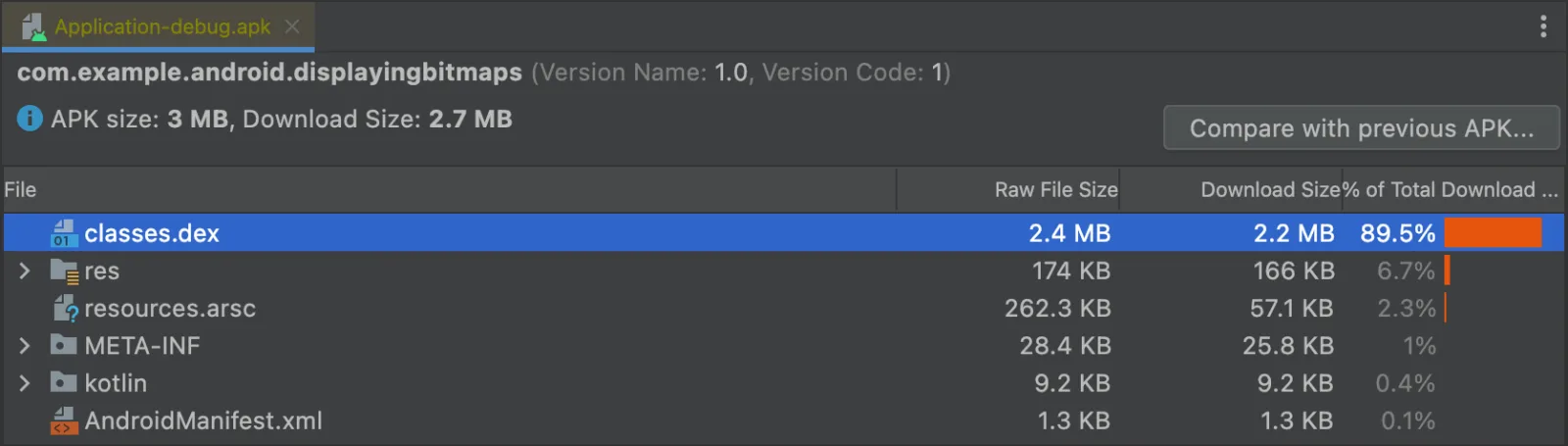
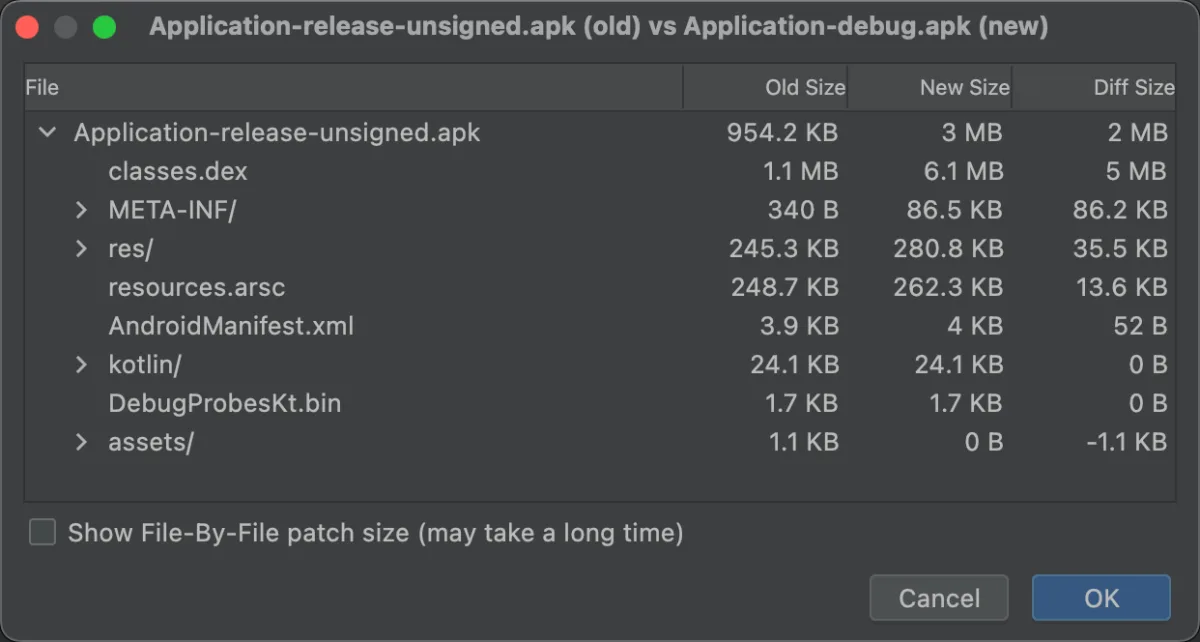
Two measurement tools close the loop. Android Studio APK Analyzer opens any APK or AAB and shows per-directory, per-class, and per-resource size; the useful view is "compare to another APK" - point at the previous release and see which file grew. Play Console size insights shows per-device install size estimates across the configuration matrix and flags large resources and unused locales - the production-side feedback loop.
The interview move: gate every release on the APK Analyzer diff vs the previous version; a PR adding more than 100 KB to dex or 200 KB to resources opens a review on whether the dependency is worth it.
See also
- Performance and Profiling - the Macrobenchmark +
BaselineProfileRulepipeline that generates the profile, and the cold-startup signal that motivates one. - Build Systems - the Gradle / AGP / KSP plumbing that runs R8 and packages the AAB; the kapt-to-KSP migration is the build-side lever.
- Compose - Compose ships its own baseline profile, and Compose-heavy code benefits more from R8's lambda-group merging than View-based UI does.
- Architecture - dynamic features are an architectural choice (which features are core, which are optional) before they are a build configuration.
- Dependency Injection - the multi-module DI graph determines how a dynamic feature plugs into the base app's component hierarchy.
Used in
- Newsfeed App - feed-first cold start is the canonical baseline-profile target; the in-app browser is a dynamic-feature candidate.
- Photo Gallery App - on-device ML for face / scene recognition ships via Play Asset Delivery rather than 40 MB of install bloat; R8 keep rules for the TFLite delegates are the interview-grade detail.
- Messenger App - voice / video calling lives in a dynamic feature when used by a minority of installs; the
OkHttp/ WebSocket holder stack is the first surface to break under R8 full mode. - Doc Editor App - CRDT and renderer engines are install-size-significant native libraries; per-ABI splits and Play Asset Delivery for fonts and templates are the size levers.
- Ride-Sharing App - in-trip maps assets are a Play Asset Delivery
fast-followcandidate; driver and rider apps share an AAB but split by dynamic features for role-specific surfaces.
Done reading? Mark it so it sticks in your dashboard.